Write Prompts That Get Great AI Results Every Time
Bad prompts get bad outputs — not because the AI is limited, but because it's being asked a vague question. The difference between a prompt that works and one that doesn't is usually 3-4 specific elements that anyone can learn in 20 minutes.
 ChatGPT
 Claudefoundersmarketersfreelancerscontent-creators
Try this starter prompt
Copy and paste this into ChatGPT or Claude with your details filled in. It's a simplified version — the full prompt chain is in the app.
Rewrite this weak prompt to get a much better AI result:

Weak prompt: [PASTE YOUR CURRENT PROMPT HERE]

Improve it by adding:
1. A role or persona for the AI ("You are a...")
2. Specific context about who this is for and why
3. Format instructions (length, structure, tone)
4. One constraint that prevents the most common failure mode

Show me the improved prompt side-by-side with an explanation of what each addition does.

→ Get the full prompt structure framework + 20 real before/after examples in AI School
How it works
- 1
Write your current prompt and identify what's vague or missing
- 2
Add a role, context, and format instruction as a minimum
- 3
Run both versions and compare the output quality
- 4
Build a personal prompt library of your 10 most-used structures
What you'll build in the app
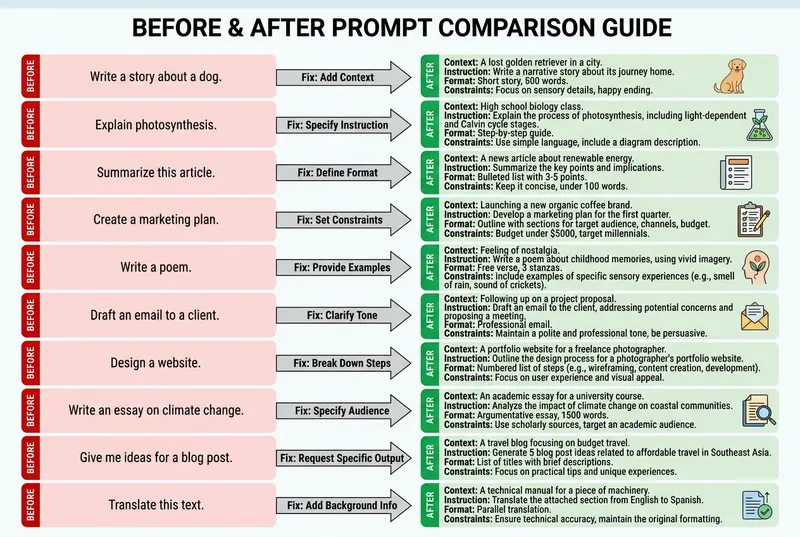
Get the full prompt framework — 6 elements, 20 before/after examples, and a personal prompt library template — inside AI School.
Want the full course?
Write Prompts That Get Great AI Results Every Time
Get the full prompt framework — 6 elements, 20 before/after examples, and a personal prompt library template — inside AI School.
Download on the App Store