Make Your AI-Written Content Sound Human
Readers can tell when something was written by AI — the filler phrases, the em-dashes, the peculiar corporate formality. Editing AI output into something that sounds like you is a skill, and once you learn the 5 specific things to fix, it takes 5 minutes instead of 20.
 Grammarlymarketersfoundersfreelancerscontent-creators
Try this starter prompt
Copy and paste this into ChatGPT or Claude with your details filled in. It's a simplified version — the full prompt chain is in the app.
You are an expert writing editor specializing in humanizing AI-generated content.

Here is an AI-generated paragraph: [PASTE YOUR AI OUTPUT]

Edit this to sound genuinely human by:
1. Removing any filler phrases ("It's worth noting that", "In today's landscape", "Moreover", "Certainly")
2. Replacing em-dashes (—) with natural alternatives
3. Adding one specific, concrete detail that couldn't have been generated generically
4. Varying sentence length (mix short punchy sentences with longer explanatory ones)
5. Cutting the word count by 15% without losing meaning

Show the edited version with a brief note on each change you made.

→ Get the full AI writing humanization checklist in AI School
How it works
- 1
Generate your content in ChatGPT or Claude first — get the substance right
- 2
Paste the output into the humanizer prompt above to identify the AI signals
- 3
Apply the edits and read it aloud — if it sounds like a human wrote it, you're done
- 4
Run the final version through Grammarly for a final polish pass
What you'll build in the app
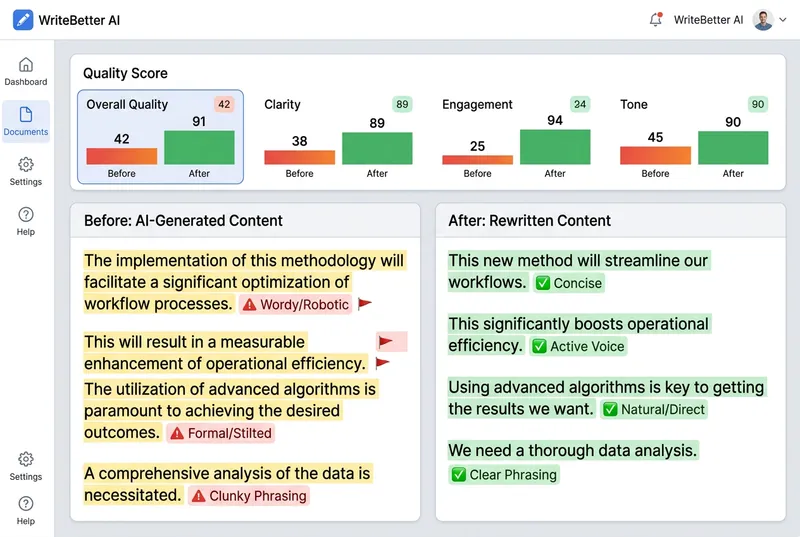
Get the full AI humanization toolkit — checklist, banned phrases list, and Grammarly integration guide — inside AI School.
Want the full course?
Make Your AI-Written Content Sound Human
Get the full AI humanization toolkit — checklist, banned phrases list, and Grammarly integration guide — inside AI School.
Download on the App Store
 ChatGPT
 Claude