Create Professional Voiceovers with Murf AI for Under $5
Professional voiceover used to cost $200+ per recording. Murf has over 120 AI voices in 20 languages, and the output is genuinely broadcast-quality. It's the fastest way to add a professional voice to any video, presentation, or ad without hiring talent.
 Murfcontent-creatorsmarketersfounders
Try this starter prompt
Copy and paste this into ChatGPT or Claude with your details filled in. It's a simplified version — the full prompt chain is in the app.
Help me choose the right Murf voice and write a voiceover script.

Content type: [e.g. "product explainer video / online course intro / podcast ad"]
Audience: [WHO IS LISTENING]
Tone: [Professional / Warm / Energetic / Authoritative / Conversational]
Length: [30s / 60s / 90s]

Write a voiceover script optimized for AI voice synthesis:
1. Short sentences (under 15 words each for natural AI pacing)
2. No ambiguous pronunciations (avoid homophones or unusual words)
3. Emotional cues in brackets [ENTHUSIASTIC] where tone should shift
4. Clear pause points for breath and emphasis

Plus: which Murf voice category would work best for this content type and why.

→ Get the full Murf voice production workflow in AI School
How it works
- 1
Write your script in short, clear sentences — AI voices stumble on long complex phrases
- 2
Add tone markers at key moments where the delivery should shift
- 3
Choose a Murf voice, preview with your script, and compare 3 options
- 4
Sync the audio to your video timeline and adjust speed if needed
What you'll build in the app
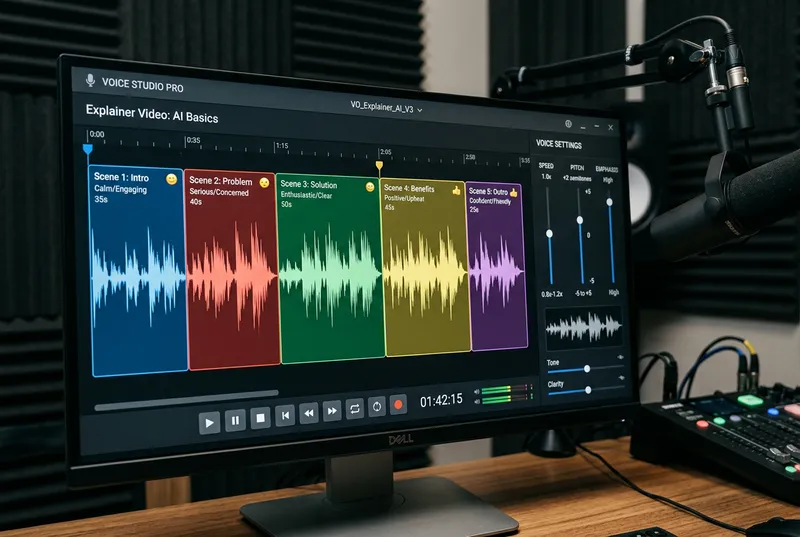
Get the full Murf production workflow — voice selection guide, script templates, and sync tips — inside AI School.
Want the full course?
Create Professional Voiceovers with Murf AI for Under $5
Get the full Murf production workflow — voice selection guide, script templates, and sync tips — inside AI School.
Download on the App Store
 Synthesia
 InVideo AI
 ChatGPT
 Descript
 Midjourney